
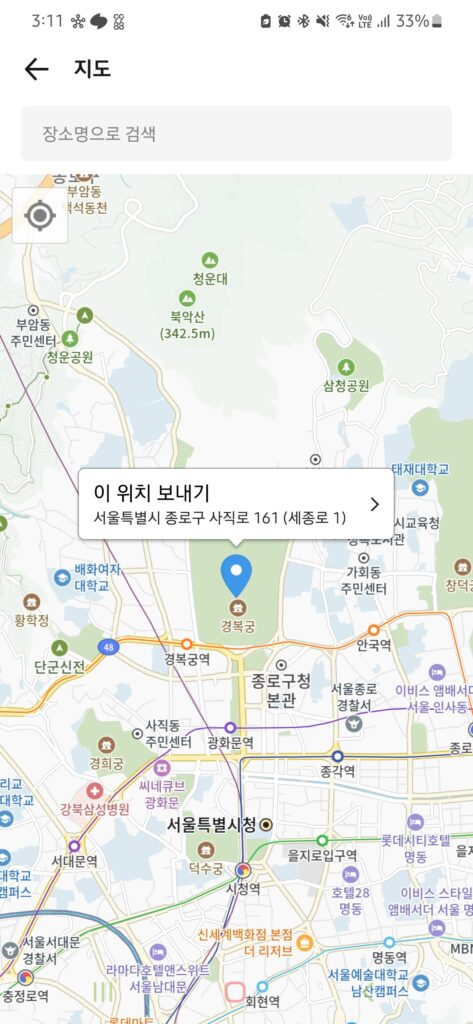
If you have spent any time in Korea, you have probably noticed that two apps dominate every Korean’s phone when it comes to getting around: Naver Map and KakaoMap. Most international travel guides tell you to pick one and stick with it. But as someone who has used both for years, my honest answer is that they serve slightly different purposes—and knowing when to use each one can make a real difference.
KakaoMap has an interesting history that most visitors would never guess. The app started its life as Daum Maps, built by Daum Communications—once Korea’s second-largest internet portal and a genuine rival to Naver. When Kakao merged with Daum in 2014, the map service came along with it and was eventually rebranded as KakaoMap. Back when I was working in financial services, I used the old Daum street view constantly to verify business addresses—checking whether a company’s registered location was a real operating office or just a paper address. At the time, Daum’s street view coverage was actually considered superior to Naver’s in many areas.
A lot has changed since then. In 2026, Daum itself was officially sold off by Kakao to an AI startup called Upstage, completing an 11-year partnership that began with the merger. But KakaoMap remained firmly within the Kakao ecosystem—connected to KakaoTalk, Kakao T, and the broader network of Korean services that most people use daily. The map and the portal went their separate ways.
Both apps work well for general navigation in Korea, and both support English. But there are genuine differences worth knowing.
| Feature | KakaoMap | Naver Map |
|---|---|---|
| English Support | Good | Good |
| Real-Time Bus Location | ✅ Excellent | ✅ Excellent |
| KakaoTalk Integration | ✅ Built-in | ❌ No |
| Kakao T Taxi Connection | ✅ Direct | ❌ No |
| Business Reviews | Kakao Place reviews | Naver Place reviews |
| Subway Fast Transfer Car | ✅ Available | ✅ Available |
| Offline Maps | Limited | Limited |
The most practical advantage of KakaoMap for daily use is its seamless connection to KakaoTalk and Kakao T. If you are looking up a restaurant and want to share the location with a friend via KakaoTalk, or if you want to call a Kakao T taxi directly to the pin on your map, KakaoMap handles this in one tap. Naver Map requires switching apps.
2. Setting Up KakaoMap in English
Download the KakaoMap app from the App Store or Google Play. The app defaults to Korean, so switching language is the first thing to do.
Open the app and tap the menu icon (three horizontal lines) in the top left or bottom right corner depending on your device.
Scroll down to Settings (설정).
Find Language (언어) and select English.
The interface will switch immediately. Search, directions, and most labels will now display in English or romanized Korean.
3. The Real-Time Bus Tracker: KakaoMap’s Strongest Feature
For bus navigation specifically, KakaoMap’s real-time tracking is excellent. When you search for a route that involves a bus, the app shows you a live map of where your bus currently is—how many stops away it is, whether it is running on time, and how crowded it is expected to be.
This feature essentially eliminates the guesswork of standing at a bus stop wondering whether your bus is two minutes away or twelve. Combined with the real-time arrival boards at most Seoul bus stops, you can plan your approach to the stop almost to the minute.
4. Finding the Subway’s Fastest Transfer Car
One feature that Korean commuters use constantly but visitors rarely discover is the subway car position guide. When you search for a subway route in KakaoMap, tap on the detailed route view and look for the car number recommendation. The app tells you which specific car to board so that when you arrive at your transfer station, you are standing closest to the exit or escalator you need.
On busy lines like Line 2 or Line 9, this can save several minutes at each transfer—a meaningful difference during rush hour when platforms are crowded and every second of positioning matters.
5. Using KakaoMap to Call a Kakao T Taxi
This is where KakaoMap genuinely pulls ahead of Naver Map for practical daily use. Once you have found your destination on the map, there is a direct option to call a Kakao T taxi to that exact location without switching apps. The pickup pin is set automatically, your Kakao T account links seamlessly, and the entire process takes about thirty seconds.
For visitors who have already set up Kakao T with a foreign phone number and international credit card, this integration makes KakaoMap the more efficient choice for any journey that might end in a taxi.
For a full guide on setting up Kakao T as a foreigner, check my complete Kakao T guide here.
My honest answer after years of using both: use Naver Map as your primary navigation tool and KakaoMap as your secondary for specific situations.
Naver Map has a larger database of business listings through Naver Place, which means more reviews, more accurate operating hours, and better coverage for smaller restaurants and cafes that may not appear as prominently on KakaoMap. For finding food specifically, Naver is still stronger.
KakaoMap is better when you are already inside the Kakao ecosystem—using KakaoTalk to communicate, Kakao T to get around, and KakaoPay to pay. In those situations, keeping everything within one connected system is simply more convenient.
Summary Checklist for KakaoMap
- Download KakaoMap and switch language to English in Settings before your first search.
- Use the real-time bus tracker to see exactly where your bus is before walking to the stop.
- Check the subway car position guide for recommended boarding positions at transfer stations.
- Use the built-in Kakao T integration to call a taxi directly from your destination pin.
- For restaurant searches and business reviews, Naver Map generally has more comprehensive coverage through Naver Place.
- Use both apps—they complement each other rather than being direct substitutes.